

The contact app that actually keeps your network perfect.
TwinContacts is a privacy-first contact manager that bulk-imports your contacts from anywhere, deduplicates them with a meticulous on-device engine, and is built to keep them clean over time with a retention-first "keep-it-perfect" digest.
v1 in progress. The data engine (import, normalize, dedupe, merge, export) and the web and native Windows shells are built and verified, with 33 automated tests passing per the repo. The v1 product work in progress is the signals-and-digest retention loop and fast capture.
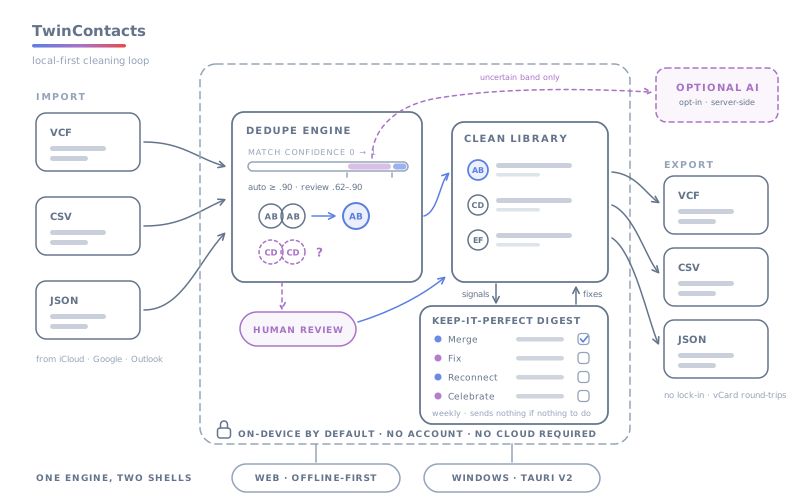
What you get.
- Local-first by default: the core loop — import, dedupe, signals, digest, export — runs entirely on your device in the browser (IndexedDB). No account and no cloud are required.
- Precision-biased deduplication: the engine would rather miss a merge than make a wrong one. A shared household or landline phone with different first names never auto-merges.
- No lock-in: import from vCard, CSV, or JSON and export back to vCard, CSV, or JSON at any time. Your cleaned library is always yours to take.
- Hybrid, opt-in AI: deduplication is 100% deterministic and offline by default; an optional LLM adjudicates only the small band of uncertain pairs, server-side, and only ever sees the few fields needed to judge one match.
- One engine, two surfaces: a single tested TypeScript engine powers both the web app and a native Windows app (Tauri v2), so the cleaning logic is identical everywhere.
- Designed for retention, not just a one-time cleanup: v1 is built around a recurring, action-dense digest that turns contact maintenance into a short weekly habit.
vCard in, vCard out — nothing lost in between.
Bulk lossless import
Drag and drop any number of .vcf (vCard 2.1, 3.0, and 4.0), .csv, and .json files at once. Format is auto-detected by extension and content; CSV headers from Google, Outlook, and iCloud exports are auto-mapped. Original field values are preserved verbatim alongside normalized forms so export stays faithful, and malformed lines become warnings instead of aborting the batch.
Meticulous hybrid dedupe and merge
A blocking step generates candidate pairs to avoid O(n²) comparisons, weighted multi-signal scoring (name, email, phone, org, address, URL) produces an explainable 0..1 confidence, and union-find clustering builds merge groups over high-confidence edges only. Confident matches merge in one click; uncertain pairs are surfaced for human review. Merges are non-destructive and field-level.
Family-phone false-merge guard
Strong identifiers boost confidence but with guards: an exact shared phone requires first-name agreement before it can auto-merge, so John, Jane, and Sarah Smith on one family landline are never chained into a single record. This guard is locked by the test suite.
Non-destructive field-level merge
Merging picks the most complete record as primary, unions all emails, phones, addresses, URLs, and categories de-duplicated by normalized key, fills singular fields from the primary then the first non-empty value, concatenates distinct notes, and reports field-level conflicts for the review UI.
Optional AI assist for uncertain pairs
With an API key configured server-side, the engine can escalate only the uncertain-band pairs (roughly 0.62–0.90 confidence) to an LLM adjudicator that returns whether two records are the same person, a confidence, and a reason. The backend supports Anthropic or OpenAI; keys stay on the server and are never placed in the browser.
Signals layer
The engine derives actionable signals from data you already hold — duplicates, syntactically invalid or bounce-likely emails, missing fields, upcoming birthdays, and stale contacts — each computed on-device. Invalid-email detection is conservative and never deletes automatically; signals only describe and suggest, never mutate contacts.
Keep-it-perfect digest
A scheduled, integration-free summary (weekly by default, user-configurable) that groups signals into one-tap actions: Merge, Fix, Reconnect, and Celebrate. It is action-dense rather than vanity — if there is nothing worth doing, it sends nothing. This digest is the v1 retention spine and is the part of v1 still being built and wired up.
Export with no lock-in
Export your cleaned, post-merge library to vCard 3.0, CSV, or JSON. vCard output is valid and round-trips back through the importer without losing names, emails, or phone keys; CSV uses widely compatible, Google/Outlook-importable headers with proper quoting.
Web app and native Windows app
The React + Vite web app is offline-first and also ships as a single self-contained TwinContacts.html file you can open by double-clicking — no install. The same UI is wrapped by a Tauri v2 shell to produce a native Windows .exe and .msi.
Optional local backend
An Express backend on Node's built-in SQLite provides snapshot persistence and acts as the AI-adjudication proxy. It is entirely optional — the web app is fully functional offline without it — and is currently intended for local/dev use.
How it works.
- Import: drag and drop your vCard, CSV, and JSON exports from iCloud, Google, Outlook, or anywhere. The engine parses and normalizes everything into one consistent contact model, preserving original values. You can also click Load sample data to watch the engine work without any files of your own.
- Dedupe: the engine blocks candidates, scores each pair on weighted signals, and clusters confident matches. It merges the obvious duplicates in one click and surfaces the uncertain ones for your review — never chaining unrelated people together.
- Merge: confirm merges non-destructively. The most complete record becomes primary, multi-values are unioned, and field-level conflicts are shown so nothing is silently lost.
- Maintain (v1, in progress): the signals layer flags new duplicates, invalid emails, missing fields, upcoming birthdays, and going-stale contacts, and the keep-it-perfect digest hands you a short, finite list of one-tap fixes on a recurring cadence.
- Export: take your cleaned library out as vCard, CSV, or JSON at any time — no lock-in.
Questions, answered.
Where is my contact data stored, and does anything leave my device?
By default, the core loop — import, dedupe, signals, digest, and export — runs entirely on your device in the browser using IndexedDB, with no account and no cloud required. Optional components are off by default: backend sync sends contact snapshots only to a server you run, and AI assist, when enabled, sends only the few fields needed to judge a single uncertain pair to the configured LLM provider, server-side. API keys are kept server-side and never placed in the browser.
Will it merge contacts incorrectly?
The engine is deliberately precision-biased: it would rather miss a merge than make a wrong one. Only high-confidence matches auto-merge, and strong identifiers have guards — for example, a shared phone number requires first-name agreement before it can auto-merge, so a family landline won't collapse different people into one record. Uncertain pairs are surfaced for your review rather than merged silently, and these behaviors are locked by the test suite.
Which file formats can I import and export?
You can import vCard (2.1, 3.0, and 4.0), CSV, and JSON, with format auto-detected and CSV headers from Google, Outlook, and iCloud auto-mapped. You can export to vCard 3.0, CSV, and JSON. There is no lock-in, and vCard round-trips back through the importer without losing names, emails, or phone keys.
Is the AI required, and what does it do?
No. Deduplication is fully deterministic and works 100% offline by default. The optional LLM is a hybrid escalation that adjudicates only the small uncertain band of pairs, runs server-side, and is opt-in. You get the full cleaning capability with no AI and no network at all.
Is it ready to use today, and what's still being built?
The data engine and the web and native Windows shells are built and verified, with 33 automated tests passing according to the repository, and bulk import, deduplication, non-destructive merge, and export work today. The v1 work in progress is the retention loop — the signals layer and the keep-it-perfect digest — plus fast capture such as business-card and QR scanning. Some of that, like the digest and signals engine code, already exists in the codebase and is being wired into the UI, while capture is still planned.
Does TwinContacts sync back to iCloud, Google, or Outlook automatically?
Not in v1. Import and export are file-based, and persistence is snapshot-based. Direct OAuth pull from Google or Microsoft, email and calendar integration, and two-way sync are explicitly deferred to later versions. We can't honestly claim live two-way sync today, so we don't.
The other tools run the same way.
-
TwinMail
Run every inbox you're responsible for, without handing over a password.
-
TwinVault
Every account your household depends on, in a vault that never leaves your browser.
-
TwinHermes
An always-on agent on a box you own.
-
TwinSystem
One repo for the whole smart home.
Your contact list is a mess. That part is normal.
Import the mess, dedupe it on-device, and export clean vCards whenever you want out.